
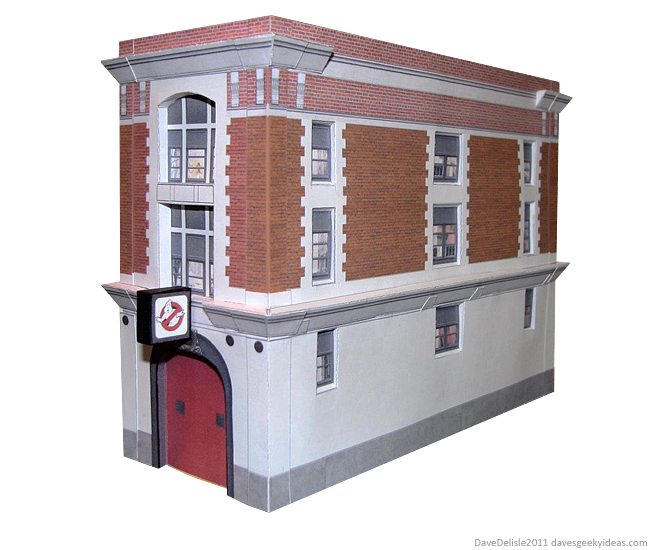
I recommend using card stock for this one, it is BIG. Normal paper might buckle. Also, my lame printer does not go as dark as I would like, so yours may be darker (do a test print). And lastly the diagram is designed with thicker card stock in mind, so scaling it down for normal paper might cause a few issues.
Right now the roof is just sitting on the building like a lid, which makes the wiring very accessible. Otherwise it’s 95% complete. Took about 3 hours to cut and assemble.
Here is your ginormous 6-page diagram. Click to enlarge, save to your computer, and then print as-is (regular 8.5″ x 11″ paper):


There are two versions of the light, a regular papercraft one and one that you can install a light for. You’ll need an electrical friend to help with the single LED light.
Mike H. sent me some pictures of his Firehouse, which is a stunning carbon copy of mine (kinda surreal to look at it). Mike recommends creating a center support plain to reinforce the building (bottom picture). I think a couple of U-shaped cross beams would do if you need support.


 Dave's Geeky Ideas
Very well done
Excellent, excellent! This is incredible detail for “only” your third design! I’m shoving stuff out of the way in my build queue to make room for this.
Perfect complement to Ecto 1
http://paperinside.com/ecto-1/
This one is to scale with the Hot Wheels size car. But it is tempting to shrink that one down or this one up for a truly complimentary package.
Aw thanks guys. I would have loved to have spent a few more days texturing, but I didn’t want to be late for Halloween – like the annual Simpsons’ Treehouse of Horror episode (What is up with that?).
Good luck and if you are able, please send me a pic of yours, I’d enjoy posting it.
Great model!
Thanks for making it available!
Jerry
You’re welcome. As I stated, I rushed this out to be in time for Halloween…I plan on releasing a nicer one (more detailed, better textures) in the new year.
Well I am looking forward to see (and build) it!
So I voted for the firehouse 2.0 to be build, but I saw you were planning on designing the BTTF courthouse also, that would be a nice model as well.
Do you allready know when in this new year we can expect the new firehouse model to be released?
Jerry
That’s a very good question. Well I have some free time in the forecast, so how does in the next few weeks sound?
This papercraft has been a hit, though I think it could look so much better. I’ve been meaning to get back at it for months.
Sorry will be a few weeks still! Been swamped with art commissions.
That´s okay, I will wait for it, also I am still busy building my paper Titanic in 1:200 scale wich I started in october 2010.
Yes, that sound fine to me, I´m looking forward to it..
Which software did you use to create the “Ghostbusters” designs?
I used Inkscape, which is a Scalable Vector Graphics program (SVG) to draw all the shapes/outlines. I then used GIMP, which is photo editing software, to create all the textures, and then to lay everything out in sheets.
Both programs are free, I recommend checking them out. Inkscape is like Adobe Illustrator or Coreldraw. GIMP is like Photoshop.
It also helps that I’m a 3D artist, but I basically stick to block shapes, so it’s not that difficult! 🙂
This is pretty cool, I did it myself and it looks just fine 😀
Another satisfied customer! Glad it turned out.
Great Dave!! Which scale is it? Thanks greets yolli
This looks like loads of fun, great job! I’ll make a tiny one for my N scale model railroad to scare all the spukes away!